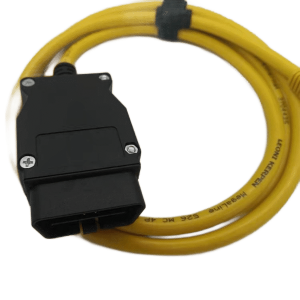
This jiatel multi-function OBD2 power cable is designed for dashcams and other car electronics. It lets you safely draw power from your vehicle’s OBD2 port without cutting any wires. The cable provides a convenient DC plug output, making installation quick and easy. With built-in low-voltage protection, it prevents car battery drain, offering a clean, reliable, and safe power solution.

The Easy and Safe Way to Power Your Dashcam
Installing a dashcam or other car device can be a hassle, often requiring complex wiring that risks damaging your vehicle’s electrical system. Our jiatel OBD2 power cable offers a perfect solution. It draws power directly from your car’s OBD2 port, so it completely eliminates the need for wire splicing. The cable’s output is a standard DC plug, which is compatible with most dashcams and other devices.

Key Features
- No-Cut, No-Splice Installation: Simply plug the OBD2 connector into your car’s port and get power instantly. The entire process avoids touching your vehicle’s original wiring, ensuring a safe and damage-free installation.
- Low-Voltage Protection: The built-in smart chip constantly monitors your car’s battery voltage. If the voltage drops below a safe threshold, it automatically cuts off power to protect your battery and ensure your vehicle can start.
- Multi-function DC Plug Output: The cable provides a standard DC plug output, so you can connect your dashcam, GPS navigator, phone charger, or other devices.
- Hidden & Clean Wiring: The cable is designed to be easily tucked away in your car’s interior panels. This keeps your dashboard clean and uncluttered, improving both the look and safety of your driving space.
- Plug-and-Play Simplicity: The installation is quick and simple. You don’t need any special tools or technical expertise.
Key Specifications
How to Use
- Locate your car’s OBD2 port, usually found under the dashboard.
- Plug this cable’s OBD2 connector into the port.
- Connect your dashcam or other device’s power plug to the cable’s DC plug output.
- Tuck the excess wire neatly into the car’s interior trim.
FAQ
Q1: Will this cable drain my car battery? A1: No, it won’t. The product has a built-in low-voltage protection feature. When the car is turned off and the battery voltage drops, it automatically cuts off the power to ensure your battery remains charged.
Q2: Is this cable compatible with my car? A2: This product works with all cars that have a standard 16-pin OBD2 port. Just make sure your dashcam uses a DC plug for power.
Q3: What’s the benefit of using the OBD2 port instead of the cigarette lighter? A3: The OBD2 port can provide more stable power and is often always-on. This allows for parking surveillance features on your dashcam while keeping your cigarette lighter port free for other devices.
jiatel: Your Trusted Partner for Automotive Electronics
jiatel is committed to providing high-quality, reliable solutions for your car. Therefore, our OBD2 dashcam power cable is the best choice for a safe, convenient installation.
Ready to easily install your dashcam? Purchase the jiatel OBD2 power cable today.