Executive Summary
This report aims to provide Volkswagen, Audi, and Skoda (VAG) owners with a comprehensive guide on OBD2 one-to-two extension cables, covering their selection, installation, and usage. The primary advantages of these cables include enabling simultaneous device connection and discreet installation, thereby enhancing diagnostic convenience and vehicle functionality expansion. However, when selecting and using such cables, it is crucial to consider their compatibility with VAG vehicle OBD2 interfaces, especially their unique purple connector, as well as potential communication limitations and battery drain issues. Understanding these key factors is essential for safe and effective OBD interface modification.
1. Introduction to VAG Vehicle OBD2 One-to-Two Extension Cables
1.1 What is an OBD2 One-to-Two Extension Cable?

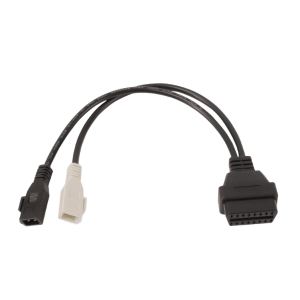
Notably, as shown in Image 1 and Image 2, some models of extension cables also include a special connector (often purple) designed to seamlessly integrate with the original OBD2 port housing and mounting bracket of specific car manufacturers. This specialized design is particularly important for the “modification” needs of VAG group vehicles.
1.2 Why “Modify” Your OBD2 Port? (Benefits for VAG Owners)
Modifying the OBD2 port offers VAG owners several benefits, especially in terms of convenience, functional expansion, and aesthetics:
- Enhanced Accessibility: Original OBD2 ports are often located in inconvenient places, such as under the dashboard or near the pedals. An extension cable can relocate this port to a more accessible or less conspicuous position. This can prevent diagnostic tools or connected devices from interfering with the driver’s feet or legs, making routine diagnostic operations more convenient.
- Simultaneous Device Connection: The “one-to-two” design allows for the simultaneous connection of multiple devices. Common applications include permanently connecting a GPS tracker or dash cam while a diagnostic scanner is also connected. This is particularly useful for owners who need continuous vehicle monitoring while keeping the diagnostic interface available for occasional use. For example, a dash cam can be continuously powered via the OBD2 port for 24/7 recording, without occupying the cigarette lighter or other power outlets.
- Discreet Installation: For devices requiring long-term or permanent installation (such as telematics systems, dash cams, or GPS trackers), a splitter cable allows the original port to be re-secured in its factory location, while the second port for the connected device can be discreetly routed behind the dashboard or inside trim panels. This practice helps maintain a clean and tidy vehicle interior while also preventing devices from being easily discovered or tampered with. This directly addresses one of the core needs implied by the user’s query for “modification.”
2. Understanding the VAG OBD2 Interface: The Importance of the Purple Connector
2.1 OBD2 Standard Overview (16-Pin, Type A)
The OBD2 standard (SAE J1962 / ISO 15031-3) specifies a 16-pin connector, with passenger vehicles typically using a Type A interface. This connector provides standardized access to vehicle diagnostic information, including Diagnostic Trouble Codes (DTCs) and real-time data.
Key pins include pin 16 for battery power (typically 12V for Type A connectors), pins 4 and 5 for ground, and pins 6 (CAN-H) and 14 (CAN-L) for common CAN bus communication protocols. Other pins are often left to the manufacturer’s discretion for their specific uses.
2.2 The “Purple Connector”: A Signature VAG Group Feature
The purple connector highlighted in Image 1 and Image 2 is a distinctive feature of the original OBD2 ports in many VAG Group (Volkswagen, Audi, Skoda) vehicles. This splitter cable is specifically designed to seamlessly mate with this OEM purple connector and its mounting bracket in VAG vehicles.
The original purple plug is typically released from its bracket by pressing clips on the left and right sides, then plugged into the black female connector of the splitter. Subsequently, the splitter’s purple male connector can be snapped back into the original factory bracket. This design ensures a secure and integrated “factory-like” fit, which is crucial for achieving the “modification” effect desired by the user. This is not merely a simple electrical connection but a mechanical integration with the vehicle’s existing architecture. This precise replication of the original mounting method ensures that the modified OBD interface remains stable, does not compromise the vehicle’s interior aesthetics, and provides a reliable physical foundation for subsequent device connections. For example, the OBD diagnostic plug mounting bracket for Volkswagen, Audi, and Skoda has a corresponding OEM part number 6N0972559. This physical compatibility is the first step in ensuring a successful modification.
2.3 Key VAG-Related OBD2 Pin Definitions and Communication Protocols
While the physical shape of the OBD2 connector is standardized, the underlying communication protocols and the use of manufacturer-specific pins can vary. Most modern VAG vehicles utilize the CAN bus protocol (ISO 15765-4), with data transmitted via pins 6 (CAN-H) and 14 (CAN-L).
Older VAG models (e.g., 1990-2001) may use the OBD1 protocol, typically accessed via a 4-pin 2×2 connector, requiring a specific adapter to convert to the 16-pin OBD2 interface. The splitter discussed in this report (based on the images and query) is designed for OBD2 ports.
VAG Group vehicles often have proprietary diagnostic protocols and functions accessible through specific tools like OBDeleven, which is officially licensed by VAG. These tools leverage the full functionality of the 16-pin connector, including manufacturer-specific pins, for advanced coding and adaptations.
It is important to clarify that physical compatibility (i.e., the purple connector physically fitting) does not guarantee full functional compatibility with all diagnostic devices, especially for VAG-specific advanced features. This is because while the OBD2 standard defines core communication pins, it also leaves “manufacturer discretionary” pins. VAG-specific diagnostic tools, such as OBDeleven, offer “broader functionality” and “One-Click Apps,” indicating they utilize these custom pins and proprietary protocols. If the splitter cable does not pass through all 16 pins completely (high-quality cables often explicitly state “all 16 leads pass through”), or if the connected device is not designed to interpret VAG’s specific protocols on these pins, full functionality may be compromised. Therefore, owners must understand that while the splitter provides a physical connection, achieving a true “modification” effect for advanced VAG diagnostics depends on the splitter supporting full pass-through of all pins and the connected device’s software being compatible with VAG’s specific communication protocols and manufacturer-defined data. This means owners cannot simply assume that any 16-pin device will perfectly support all VAG-specific functions just because the splitter physically fits.
3. Compatibility Guide: Volkswagen, Audi, and Skoda Models
3.1 General VAG OBD2 Compatibility
Most gasoline vehicles produced since 2001 and diesel vehicles produced since 2004 are OBD2 compatible, even if they are not explicitly listed in compatibility charts. However, the mere presence of a 16-pin connector does not automatically guarantee full OBD2 compatibility, especially for older models.
The OBD2 port is typically located within two feet of the steering wheel, often under the dashboard in the driver’s footwell.
3.2 Specific Models and Years Known to Use the Purple Connector
While there isn’t an exhaustive list explicitly detailing all VAG models and years that use the purple OBD2 port housing, existing information suggests its widespread presence in many modern Volkswagen, Audi, and Skoda vehicles. The splitter cable is specifically designed for vehicles where the existing OBD2 connector is “light purple” in color.
Here are some examples of specific models and their OBD2 port locations where the purple connector has been observed:
- Audi: A3 (2008, 2013), A4 B8 (2010).
- Skoda: Octavia MK2 (2012), Superb Mk2.
- Volkswagen: Golf (MK6), Jetta, Passat (B7 2010-2015).
Recommendation: Before purchasing such a specific splitter cable, owners should visually inspect their vehicle’s OBD2 port to confirm the presence of the purple housing.
3.3 Table 1: VAG Group OBD2 Port Compatibility and Location Guide
| Brand | Example Models | Approximate OBD2 Compatible Year Range | Typical OBD2 Port Location | Purple Connector Presence Indication |
| Volkswagen | Golf MK6, Jetta, Passat B7 | Gasoline 2001+, Diesel 2004+ (some models 1996+ already use 16-pin) | Driver’s side under dashboard, usually below steering wheel or above pedals | Common, many models have a purple or pink-purple OBD2 port |
| Audi | A3 (8P), A4 (B8) | Gasoline 2001+, Diesel 2004+ | Driver’s side under dashboard, usually above pedals | Common, OBD2 port housing may be purple |
| Skoda | Octavia MK2, Superb Mk2 | Gasoline 2001+, Diesel 2004+ | Driver’s side under dashboard, usually below steering wheel or above bonnet release lever | Common, OBD2 port typically purple |
This table aims to provide a quick reference to help owners initially determine if their vehicle might be compatible with this type of OBD2 splitter featuring a purple connector. Final confirmation still requires visual inspection of the actual port in the vehicle.
4. Applications and Use Cases for OBD2 Splitters
4.1 Simultaneous Connection of Multiple Devices
OBD2 splitters significantly expand the utility of the vehicle’s diagnostic port, allowing users to integrate more in-car electronic devices without sacrificing primary diagnostic functionality:
- Dash Cams: A common application is to provide continuous power to a dash cam, enabling it to record 24/7 even when the vehicle is off, without occupying the original OBD2 port. This is particularly useful for parking surveillance and vehicle security.
- GPS Trackers: Fleet management or personal vehicle tracking devices often utilize the OBD2 port for power and data. Splitters allow for semi-permanent installation of these devices while keeping the main port free for other uses. This offers great convenience for users who need continuous tracking of vehicle location and operational status.
- Diagnostic Tools and Monitors: Users can connect a real-time data display or a specific monitoring tool (e.g., for TPMS reprogramming) to one port of the splitter, while leaving the other port available for a full diagnostic scan tool to be used when needed. This avoids the hassle of frequently plugging and unplugging devices, ensuring immediate and convenient diagnostics. For example, live data can be read while fault codes are simultaneously read and cleared.
4.2 Repositioning the OBD2 Port for Convenience or Concealment
In addition to connecting multiple devices, OBD2 extension cables can also be used to change the physical location of the port:
- Enhanced Convenience: Even without splitting, a simple extension cable can move the OBD2 port from an inconvenient location to a more easily accessible spot. This can prevent the port or connected devices from interfering with the driver’s feet or legs, making routine diagnostic operations easier.
- Achieving Concealment: For security or aesthetic reasons, the original OBD2 port can be re-secured in its original position, while the extended portion of the splitter can be routed to a hidden compartment or behind trim panels, making connected devices less conspicuous. This is a core manifestation of the “modification” intent, aiming to keep the vehicle interior tidy while protecting connected devices from easy discovery.
4.3 Improved Diagnostic Accessibility
For professional technicians or advanced DIY enthusiasts, having a readily available and easily accessible OBD2 port via an extension cable can streamline the diagnostic process, especially when the original port is difficult to reach or requires frequent use. This increases efficiency and reduces operational inconvenience.
5. VAG OBD2 Splitter Cable Installation Guide
5.1 Pre-Installation Checks and Safety Precautions
Before proceeding with any installation, thorough checks and necessary safety measures are crucial to ensure a smooth and safe operation:
- Vehicle Compatibility Confirmation: Always confirm that your VAG vehicle’s OBD2 port is a 16-pin Type A connector and features the characteristic purple housing shown in Image 1 and Image 2. If the port type does not match, the cable will not install correctly.
- Cable Quality Check: Ensure that the chosen splitter cable explicitly states “all 16 leads pass through.” This means that every pin inside the cable is connected to its corresponding pin on the vehicle and device, maintaining a complete communication link. High-quality cables typically use robust materials like PVC and copper to ensure long-term reliable performance and data transmission integrity.
- Disconnect Battery: Although not explicitly required for all installation steps, disconnecting the negative terminal of the vehicle’s battery is a general best practice before working with any vehicle electrical components. This effectively prevents accidental short circuits or damage to the vehicle’s electronic systems.
5.2 Step-by-Step Installation Process
Installing an OBD2 splitter cable typically involves the following steps, designed to ensure proper and secure connection of the cable to the vehicle’s OBD2 port:
- Locate the OEM OBD2 Port: The OBD2 port is usually found under the dashboard, near the steering wheel or pedal area. In some models, a slight lean or the use of a flashlight may be necessary for clear visibility.
- Remove the Original Port: The original purple OBD2 port is typically secured by clips or tabs within its bracket. Gently press these clips (usually on the left and right sides) and release the port from its mounting location. Sometimes, removing related interior trim panels may be necessary for easier access.
- Connect the Splitter: Plug the removed original OBD2 port into the black female connector of the splitter cable. Ensure a secure connection.
- Re-secure the Main Splitter Connector: Snap the purple male connector of the splitter cable back into the vehicle’s original OBD2 port mounting bracket. This keeps the main connection point stable and in its intended position, just like the original port.
- Connect Your Devices: Plug your desired OBD2 device (e.g., scanner, tracker, dash cam) into either of the remaining female OBD2 ports on the splitter cable.
5.3 Discreet Wiring Techniques
Successful modification is not just about functionality but also about clean and safe installation. This requires careful planning by the owner during installation, beyond simple plug-and-play:
- Utilize the flexibility of the splitter cable (e.g., 30 cm/12 inches long) to route auxiliary connection lines behind dashboard panels, under carpets, or along existing wire harnesses.
- Use zip ties or adhesive tape to secure the cable and any connected devices, preventing them from rattling or moving during vehicle operation, while ensuring that the wiring does not obstruct pedal movement or airbag deployment.
- This means users need to consider the physical layout of their specific vehicle and carefully plan the cable routing and device placement, rather than simply assuming a straightforward insertion will suffice. This meticulous planning is key to ensuring a modification that is both safe and aesthetically pleasing.
6. Important Considerations and Potential Limitations
6.1 Communication Challenges with Simultaneous Device Connection (ECM Interaction)
A key limitation is that while two devices can be physically connected, the vehicle’s Engine Control Module (ECM) or other control units are typically designed to communicate with only one diagnostic device at a time.
- Potential Issues: Attempting to run two active diagnostic tools simultaneously (e.g., two scanners querying data at the same time) can lead to communication conflicts, data corruption, unreliable readings, or even system freezes. One of the devices may not operate properly.
- Best Practice: For critical diagnostic or programming tasks, it is strongly recommended to use only one OBD2 device at a time. Splitters are better suited for connecting one active diagnostic device and one passive device (e.g., a dash cam that only draws power or a GPS tracker that primarily listens for data).
- The inherent design of the OBD2 protocol prioritizes single-point diagnostics, making true “multitasking” in terms of active communication difficult, even with a physical splitter. The OBD2 system was originally designed for mechanics to connect to the car’s computer, not for handling multiple active requests simultaneously. Therefore, splitters primarily offer convenience and passive monitoring capabilities, rather than parallel active diagnostics. Owners must understand this fundamental limitation to avoid operational frustrations or potential issues with vehicle systems.
6.2 Battery Drain Issues with Continuously Powered Devices
The OBD2 port typically provides constant battery power, even when the ignition is off (pin 16).
- Continuously powered devices like dash cams or GPS trackers can drain the vehicle’s battery over extended periods, especially if the vehicle is not driven regularly. This risk increases for older or weaker batteries, or with devices that have additional power-consuming features like Bluetooth or Wi-Fi.
- Mitigation: Users should consider choosing low-power devices, devices with automatic shut-off features, or explore alternative power solutions if continuous long-term operation is required. Regularly checking battery health is also crucial.
6.3 Choosing the Right Cable (Length, Quality, Pin Pass-Through)
- Length: Splitters are available in various lengths (e.g., 4 inches, 12 inches, 30 cm, 1 meter). Choose an appropriate length based on your planned installation and routing needs.
- Quality: Select cables made from durable materials (such as PVC and copper) to ensure longevity and reliable performance.
- Full Pin Pass-Through: Most importantly, ensure the cable explicitly states “all 16 leads pass through.” This guarantees that all communication lines, including manufacturer-specific ones, are maintained, which is essential for comprehensive VAG diagnostics and full device functionality.
6.4 Potential Interference and Data Integrity
While high-quality cables are designed to minimize this, adding an extension or splitter cable can theoretically introduce slight signal attenuation or electromagnetic interference, especially if the cable is excessively long or poorly shielded. For critical applications, ensure the cable meets relevant standards and comes from a reputable manufacturer.
7. Conclusion and Recommendations
OBD2 one-to-two extension cables, particularly those designed for the unique purple connector of VAG Group vehicles, offer significant advantages to owners, enhancing diagnostic accessibility, integrating permanent devices like dash cams or GPS trackers, and enabling discreet, professional installations.
“Modification” is not just about adding a port, but about physically integrating the cable with the vehicle’s original mounting bracket for a secure and aesthetic fit.
However, owners must be clearly aware of the limitations of simultaneous active diagnostic communication, as most vehicle ECMs are designed for single-device interaction. To ensure reliable operation, it is recommended to use only one active diagnostic tool at a time.
For continuously powered devices, battery drain issues must be carefully considered. For long-term installations, choose low-power devices or explore alternative power sources.
Always select high-quality cables that ensure full 16-pin pass-through to maintain data integrity and compatibility with VAG-specific protocols. Before purchasing, it is strongly recommended to visually inspect your vehicle’s existing OBD2 port for the presence of the purple housing.
By understanding these nuances, VAG owners can successfully leverage OBD2 splitter cables to effectively and safely customize their vehicle’s diagnostic interface.